In what seems like a particular irony for someone who develops apps for a living, I mostly hate my smartphone. I hate how it always demands my attention, and how easy it is to get sucked into a rabbit hole of scrolling through some social media feed. I hate that every time I'm bored for 10 seconds, I automatically reach for it.
I've tried various screen time blocking apps, including my favorite, Brick, which makes you to tap your phone to a physical plastic brick to unlock blocked apps, but in the end I give in to temptation after a few days, unlock it for something, and just leave it that way for days before getting frustrated starting the process over.
So for the last 3 months, my smartphone has lived almost entirely in a drawer, and I've been using this as my phone:
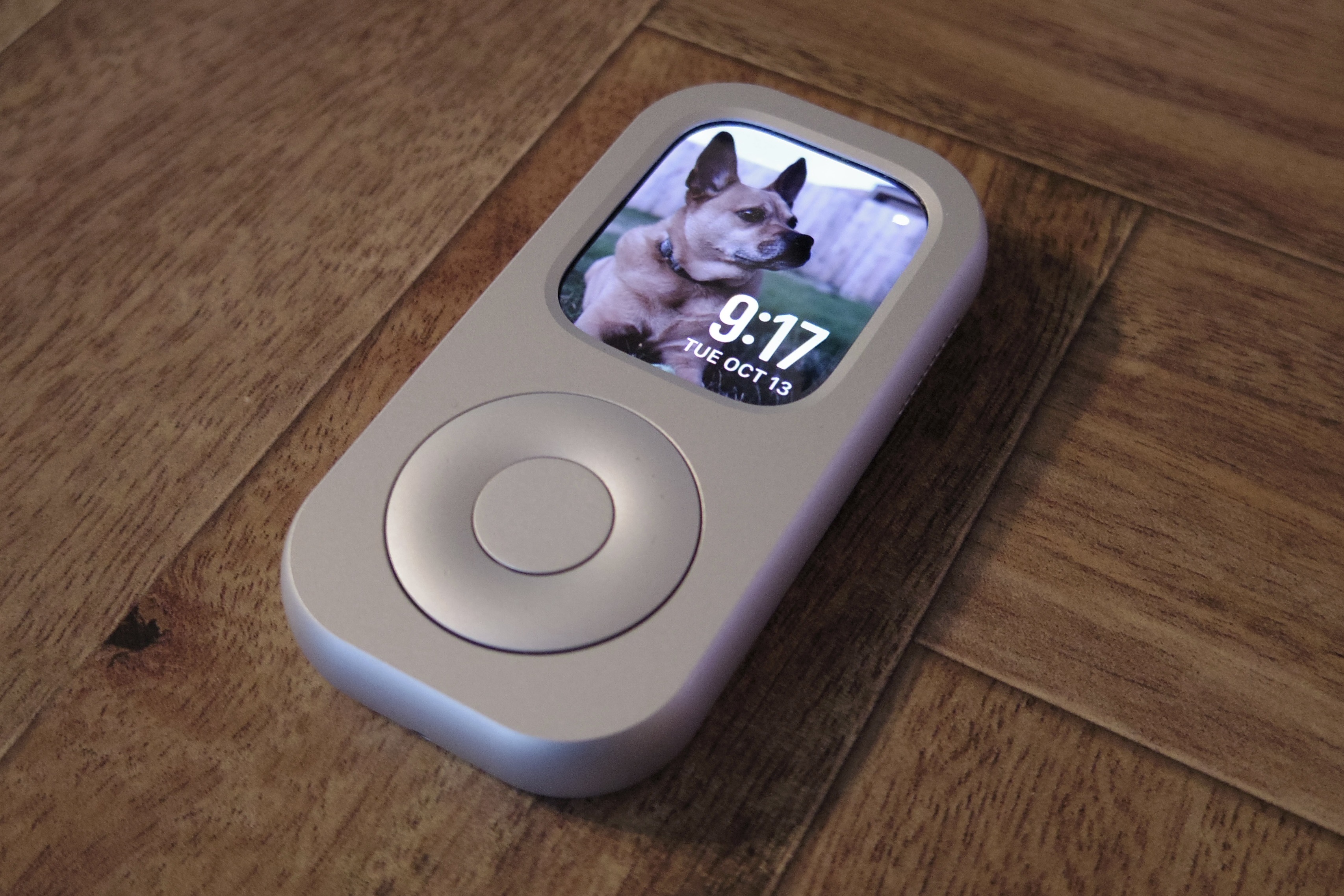
It is a cellular-capable Apple watch inside of a case. The case uses a mechanical mechanism (with a little rubber band) to turn the digital wheel when you turn the scroll wheel. The wheel is wonderfully tactile and works well. As you can see, it looks a lot like an iPod, and I'm really enjoying it.
I can hear many of you asking the obvious question: Why not just wear the watch on my wrist? I have always liked wearing an automatic watch, and I just can't get excited about wearing a little computer on my wrist. I also just don't really like notifications on my wrist—I hate the urge to glance at down mid-conversation because my watch tapped me, it feels rude. I want to be able to set my notifications aside if I want to. But the Apple watch is an incredible and capable little piece of hardware.
I tried a few different cases, but the one I settled on was the RePod. Of the ones I've tried, it was the most compact, and had the best functioning scroll wheel. My second favorite case was this one. It was heavier, a bit bigger, and the screen is flush with the case. That did make it easier to tap the edges of the screen. But the scroll mechanism was less smooth and consistent compared to the RePod. Both leave the back of the watch exposed, so you can easily charge it.
This definitely isn't for everyone, and I'm aware a lot of people will find this pretty stupid. But below, I'll highlight why I like it, some of the downsides, and how to set up an Apple watch this way if you want to try it.
Why I Like It
- Everything I Need Is There: I can send and receive messages, use maps, get calls, see my calendars, and access my music. I can start the climate control on my car. There is even a great recipe app, Ambre that I use that works really well when cooking. I could have my email on there, but I don't.
- Tap to Pay Still Works: I can still tap to pay just fine, I just have to type in my passcode first (more on that below).
- No Distractions: No social media, no browser. Having used it for 3 months, I love that I no longer automatically reach into my pocket the second I'm bored.
- Minimal Notifications: I only allow the apps I really need to know about deliver notifications to the watch. The others I can check when I'm back sitting at my Mac. So for me, that mostly means calendar, and messaging apps.
- It's Tiny: Smartphones have gotten so big. This is so small, and light, and unobtrusive. I barely notice it's there.
- It's a Conversation Starter: Some might find this a negative, but people ask me about it all the time. "What is that?", and "Is that an iPod?" are the most common questions—I get them almost every time use it to pay for something. I think this is great fun! One of the sad things about smartphones is they can isolate us from strangers around us, and by nature of its novelty, this does a bit of the opposite.
The Downsides
There are some definite downsides, and some of these would be dealbreakers for many:
- No Camera: I like to carry a small camera with me a lot anyway, but many places expect you to be able to scan a QR code to pay, view a menu, etc. That can pose a problem.
- Extra Expenses: You still need an iPhone to set up the Apple watch, so this is a second expensive device. And you need to pay for cell service on the watch (for me, it's $5 a month).
- Some Apps are Useless Alone: Some apps don't work when not connected with the companion phone, or regularly break. For example, my garage door app works most of the time, but if I haven't opened the app on my phone in a while, it will eventually stop working on the watch and tell me to open the app on the phone. Some other apps just don't update at all without the phone nearby.
- You Still Need a Phone: Ultimately, sometimes, I still need to do something on the phone that just isn't possible on the watch or on my Mac.
- Everything is on Speakerphone: Unless you also carry headphones, any calls you get are effectively always on speakerphone. This works in a pinch, but if you get a lot of calls, or need to take private calls, you probably also want to always carry headphones.
- You Lose Health Features: If you care about the health features the Apple watch provides, you obviously lose almost all of those (no more sleep or activity tracking).
- No Car Bluetooth or Carplay: You can't connect an Apple Watch to the car for audio. I'm lucky in that my car has built in streaming and audio apps like Apple Music and Spotify, as well as Google Maps, so this isn't an issue for me.
How to Do This Yourself
There are a few settings you'll want to change if you want to do this yourself.
Disable Wrist Detection: Located in Settings > Passcode. Otherwise, every time you interact with the watch, you have to type in your passcode. With this off, you will only need to enter your passcode to do sensitive things, like autofilling a password, or using Apple Pay. It will also automatically lock when charging.
Enable a Shortcut to Lock the Watch: After disabling wrist detection, the watch will be always unlocked. If you want to lock it, you can set a quick shortcut in control center to lock it. Tap the side button to open control center, scroll down and tap edit, and then tap the + button. Under the Settings header, you'll see a "Lock" button. Then it's really quick to lock the watch when you need to.
Disable Unnecessary Sensors: Since you're not wearing the watch, you can disable the sensors and save battery life, and stop the back of the watch from flashing lights randomly and unnecessarily. Go to Settings > Privacy & Security > Health and disable Heart Rate, Blood Oxygen, Wrist Temperature, Respiratory Rate, and Time in Daylight.
Orientation: Most cases flip the crown to the left side, so you'll want to go to Settings > General > Orientation and set the digital crown to the left side.
Some Optional Settings: In Sounds & Haptics, I have the volume level set to Louder, and you may want to set Habits to Prominent. The default settings are designed for a watch on your wrist, not in your pocket. In General settings, I have Return to Clock set to 1 hour. I never need an app open that long, but I sometimes want an app open for more than 2 minutes. You may also want to set the App Library to list mode, I find that works more naturally with the scroll wheel.
Will I keep using this?
So far, the only time in the last 3 months I really felt I had to carry my phone was when traveling. It seemed to risky to not bring my phone. Hotels have apps, I might need an Uber, am more likely to need to look something up, etc. So when I traveled, I carried my phone. But I kept it in a bag, and kept it off most of the time. It was just there for backup, in case I needed it. And I did, a few times.
Using the watch as my phone has resulted found me reading and writing more, and made me more disconnected from social media, which I find is a net positive for my life and mental health. So for now, I plan to keep using it. I'll post again after a year of use to check in.